
One AI sees, another decides. This is the interface between them — live, with everything the sensor cannot see hatched and everything it gets wrong in red.
▶ Start the DemoRuns in Your Browser · No Install · No Upload
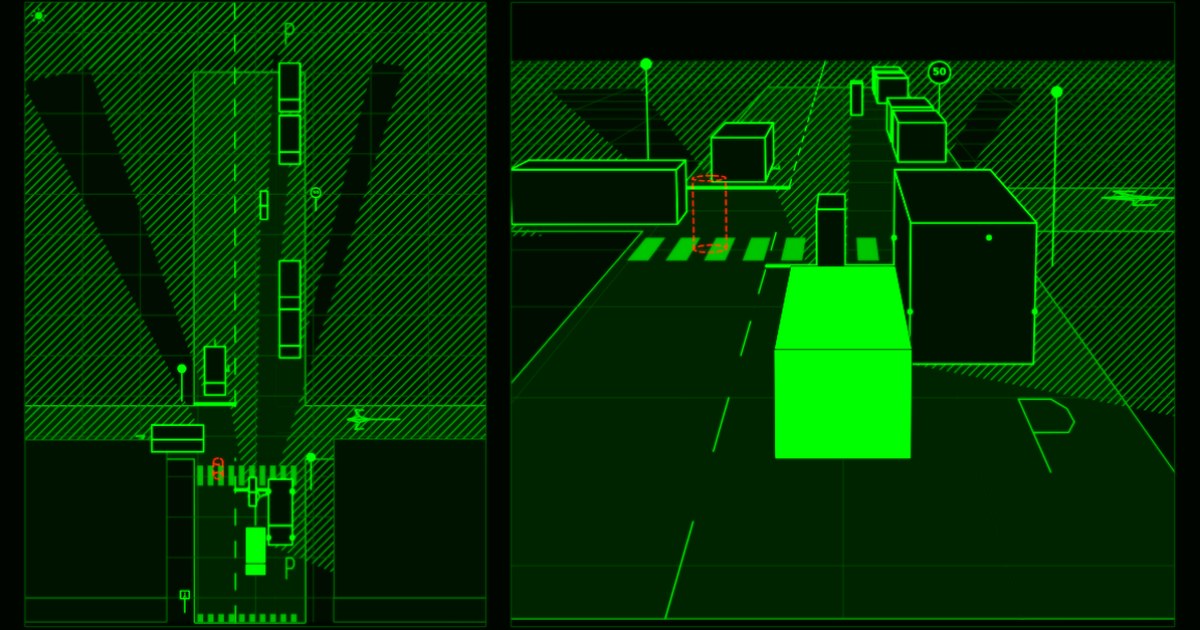
PERCEPTION FRAME · TOP VIEW · DRIVER VIEW
Perception is statistical AI — object detection and classification: trained, never certain. Decisions can be deterministic rules under ISO 26262. They need different proof.
The logic takes the driving test. The perception takes the medical exam: does it see what a driver must see — and say what it cannot?
Between them sits the perception frame: facts only, the same for camera, radar or lidar. If a driver can drive on it, the perception passes.
SOTIF — Safety of the Intended Functionality — covers the hazards that remain when nothing is broken, and in automated driving most of them sit in perception. The demo makes them visible: every error has an address, the limits are part of the output, and any scenario can be edited to play through its triggering conditions.
A prototype: the reference perception is geometric and the errors are injected by hand. It shows the interface — the validation itself is still to be done.
Everything the perception reports at one moment: road users from object detection with their lamps, areas hidden by occlusion or out of sensor range, lanes, traffic lights, traffic signs, sirens and driving conditions. Facts only, no predictions, no decisions.
None in particular, and that is the point: the frame is the same for camera, radar, lidar or a fusion, so different perception stacks can be compared on the same scenarios.
Yes. Load any CommonRoad file, or download a scene as JSON under Options, edit it and load it again. Files stay in your browser.
Write to us — you’ll reach the engineer who built the demo.
✉ Write to Us