
Your models work. Can you prove it?
EverTest is a qualifiable dynamic verification tool for Simulink, Stateflow and TargetLink models. Run unit tests, automate SIL/PIL back-to-back testing and generate compliance-ready reports — without leaving your MATLAB environment.
⬇ Download Free Trial See FeaturesFree Trial · All Features · No Credit Card
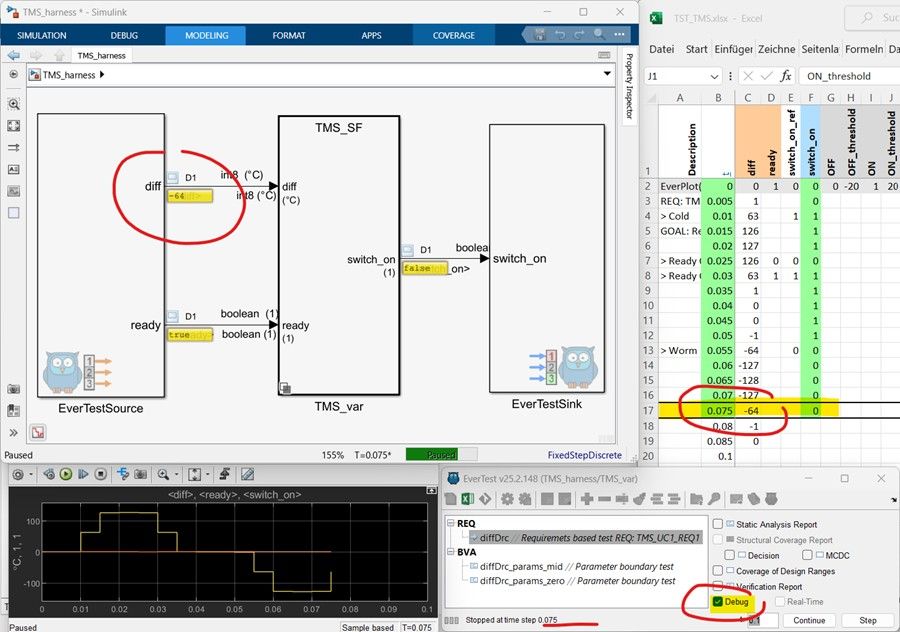
EVERTEST GUI · TEST SPECIFICATION VIEW
Setting up a test harness for every Simulink subsystem manually is slow and error-prone. EverTest generates it automatically — interface definition included.
Back-to-back verification between model and C code is required by ISO 26262 — but setting it up is painful. EverTest makes it a one-click operation.
Generating audit-ready verification reports manually is a bottleneck. EverTest produces HTML reports automatically — with traceability built in.
From harness generation to compliance reports — one tool, your MATLAB environment.
EverTest verifies how your model behaves. To check that the model is built correctly in the first place — modeling guidelines, design rules, static analysis — see EverCheck, our companion tool. Clean the model with EverCheck, then verify it with EverTest.
Isolate any Simulink subsystem instantly. EverTest builds the harness, defines the unit interface, and sets up MIL, SIL and PIL simulation — automatically.
Test cases are plain Excel tables — no scripting, no code. Define inputs, expected outputs and parameters directly in a spreadsheet. Human-readable, easy to review, and ready for AI agents to generate or extend test cases automatically.
Define inputs, outputs and parameters with full type, dimension, min/max, unit and description — all in one structured sheet. EverTest keeps everything consistent across test cases.
Run test cases one-by-one or in batch via GUI or command-line API. Fully scriptable — ready for CI/CD pipelines and AI agents to generate new test cases automatically, drive test execution, and evaluate results.
Back-to-back testing verifies numerical equivalence between your Simulink model and generated C code. EverTest automates the SIL/PIL back-to-back testing workflow and C code integration, supporting a wide range of embedded targets.
Link test cases directly to requirements. The Requirements Traceability Matrix answers where each requirement is implemented, where it is verified, and what the verification results are.
Track Decision Coverage and Modified Condition/Decision Coverage (MCDC) at model and C code level. Verify boundary values — ensuring signals and parameters are tested across their full specified limits.
Pinpoint failures directly in Simulink models or integrated C code — using the built-in model debugger (MIL), Microsoft Visual Studio (SIL) or Lauterbach Trace-32 (PIL).
Test specifications live in Excel. Results export automatically to XML and HTML. Readable by engineers, reviewers and auditors alike. Import and export MDF4, MAT and Signal Builder data.
EverTest generates EverView — a single self-contained HTML file that looks and navigates exactly like your Simulink model. Share it with anyone on your team for offline inspection, annotations and review comments — no MATLAB license required.
EverTest ships with a TÜV SÜD-assessed safety manual and a complete Qualification Kit. Run the validation test suite in your own environment, document the results — you are qualified.
From function developers to safety managers, EverTest fits every role in a model-based development team — fast MIL/SIL verification for engineers, Excel-defined test cases without scripting, CI/CD automation for tool-chain managers and TCL 3 qualification evidence for safety managers.
"I need to verify my models fast, without process overhead."
Define test cases in Excel, generate the harness automatically and run MIL/SIL tests with pass/fail results — all without leaving MATLAB.
"I need proof that our tools and results are audit-ready."
Use the TCL 3 Qualification Kit and TÜV SÜD-assessed safety manual to qualify EverTest in your project environment. Requirements traceability and verification reports included.
"I need a consistent verification process across my team."
EverTest's structured Excel format and automated reporting keep every engineer on the same workflow — and every audit consistent and repeatable.
"I need to integrate and qualify tools in our CI/CD pipeline."
Deploy EverTest via CLI/API into your pipeline. The Qualification Kit covers TCL 3 and reduces qualification effort — keeping your tool chain compliant and automated.
"I need to review the model but I don't have a Simulink license."
EverView exports your Simulink model as a single HTML file — fully interactive, hierarchical, with signal plots and look-up tables. Share with reviewers and assessors who have no MATLAB installation. No extra license required.
"I need to run model tests automatically on every commit."
EverTest's CLI and API integrate directly into Jenkins, GitLab CI and other pipelines. Trigger full test suites, collect pass/fail results and generate verification reports — without any manual steps.
EverTest is a qualifiable tool assessed for use in safety-critical automotive and industrial projects.
→ Learn how ISO 26262 tool qualification works — Part 8 Clause 11 →
Everything you need to download, install and start verifying your Simulink models today.
Get the latest EverTest installer directly from EverBits — free trial, no commitment required.
EverTest runs entirely inside your MATLAB R2018a or later environment.
Flexible licensing options for individuals and teams — annual, perpetual or network-based.
Short tutorials walking through the EverTest workflows on a real Simulink model — harness generation, test specification, structural coverage, SIL and back-to-back testing. One video each, free to watch, no registration.
A complete tour of the EverTest feature set — test harnesses, coverage, closed-loop testing, SIL and PIL with integrated C code.
Fourteen minutes from what ISO 26262 expects of a verification tool to the report your assessor receives.
Answers based on the EverTest product help — from harness setup to ISO 26262 qualification.
Download the trial, run it in your MATLAB environment and see how fast verification can be.
From 2,000 € / year per user · qualification kit & EverView included · see full pricing →
⬇ Download Free TrialNo commitment. No credit card.
Or write to us at support@everbits.com