
Your models comply. Can you prove it?
EverCheck is a qualifiable static analysis and correction tool for Simulink, Stateflow and TargetLink models. Check modeling guidelines, apply automated design fixes, handle exclusions and generate compliance-ready reports — without leaving your MATLAB environment.
⬇ Download Free Trial See FeaturesFree Trial · All Features · No Credit Card
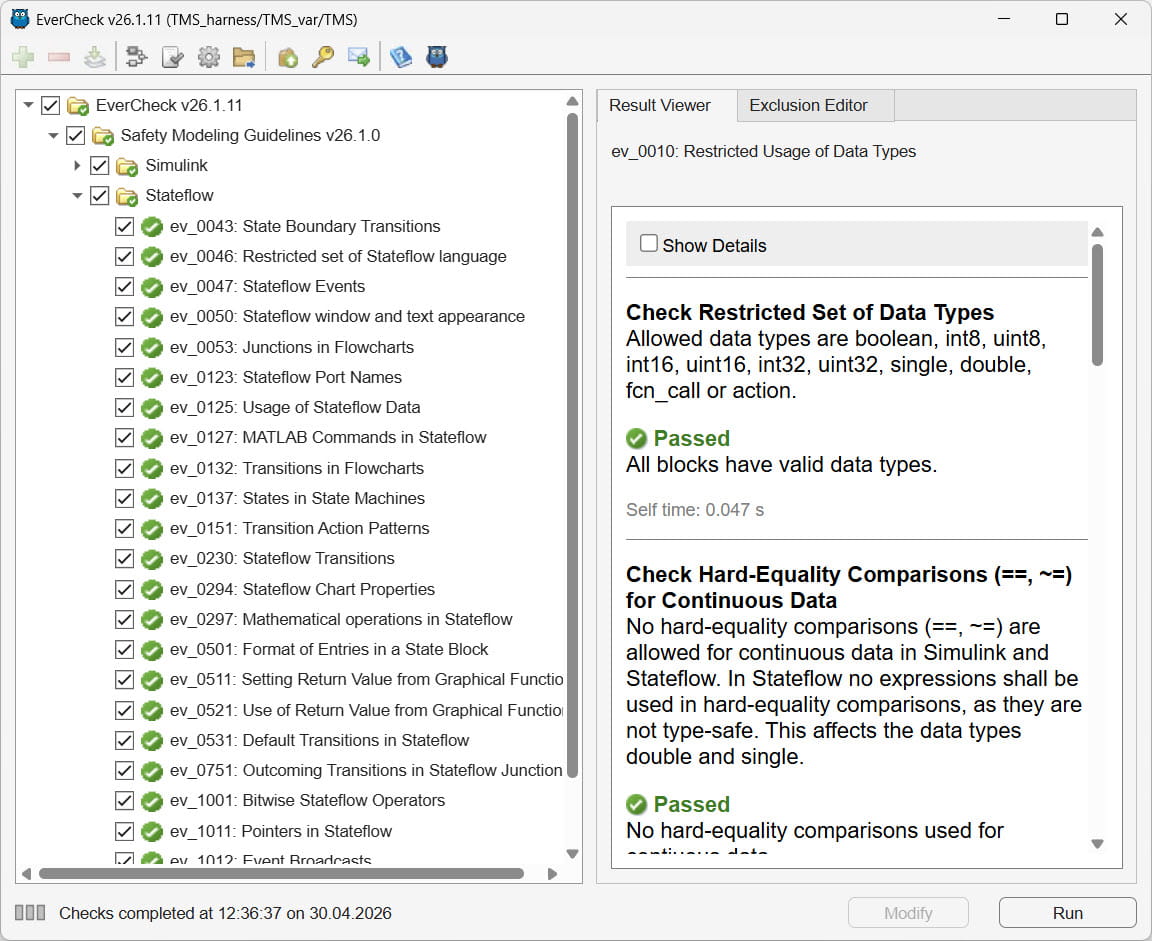
EVERCHECK GUI · STATIC ANALYSIS RESULTS VIEW
On large models, a first check run can surface many violations. EverCheck provides one-click automated fixes for most of them — applied directly to the model, done before the next coffee break.
Most Simulink guideline checkers are too slow to run continuously. EverCheck completes the full analysis in seconds — so violations are caught the moment they are introduced, not weeks later in review.
EverCheck generates an HTML verification report automatically — with all check results documented and exclusions recorded. No manual writing, no formatting. Ready to share with reviewers and auditors as-is.
EverCheck gives you three things: a clean model, a consistent check configuration your whole team reuses, and a verification report that stands up at audit.
EverCheck makes sure your model is built correctly. Once it is clean, you still need to verify how it behaves — that is where EverTest, our companion tool, takes over with dynamic testing, SIL/PIL and coverage. Check with EverCheck, then verify with EverTest.
Point EverCheck at any Simulink subsystem or library. It reads the model structure, discovers all blocks and prepares the full analysis immediately — no scripts, no setup files, no waiting.
EverCheck runs static checks derived from MAAB, NASA, MISRA and ISO guidelines. Every violation is reported with its exact location in the model and a description of the required correction — ready to act on immediately.
Select which checks to run and configure their settings in the GUI — then export the configuration to a single file. Share that file with the team and every engineer runs exactly the same checks, every time. Simple to set up, well documented.
EverCheck fixes most violations automatically — one click applies the correction directly to the model. No manual editing, no guesswork. Re-run the checks to confirm the model is clean.
EverCheck is designed for the engineer working directly in the GUI — open a model, run the checks, fix violations, done. The command-line API lets scripts and AI agents run checks and generate reports across multiple models without any manual steps.
Not every violation requires a fix. EverCheck lets you exclude specific violations with a documented justification — stored directly in the model, no extra files needed. Exclusions are tracked by System ID (SID), re-applied on every run and remain in libraries for reuse. If a model change makes an exclusion obsolete, EverCheck detects it automatically. Auditors see every accepted deviation in the verification report.
EverCheck generates a single self-contained HTML verification report. It opens in any browser — no MATLAB, no EverCheck, no internet required. The report shows the full model hierarchy, color-coded pass/fail/warn results for every check, timing per check and all documented exclusions. Share it with reviewers and auditors as-is.
EverCheck ships with a pre-qualification package covering TCL 3: a safety manual, a validation test suite and TCL assessment templates. Run the validation tests in your own environment, document the results — your qualification is complete. TÜV SÜD can assess your work products produced with EverCheck. How ISO 26262 tool qualification works →
"I want clean models without spending half my day fixing guideline violations."
EverCheck runs inside your MATLAB session. Open a model, run the checks, fix most violations in one click. The whole cycle takes minutes — not hours.
"I need every engineer on my team checking against the same rules — every time."
One configuration file. Shared across the team. Every engineer runs the same checks with the same settings — no drift between developers, no surprises at audit.
"I need static model analysis running automatically — on every model, every commit."
Call EverCheck from any CI/CD system via the command-line API — checks run, reports generate, results land wherever you need them. TCL 3 qualification kit included.
"I need a verification report that stands up at audit — and a qualified tool to produce it."
EverCheck ships with a TCL 3 Qualification Kit — run the validation tests in your environment. The automatically generated report provides the compliance evidence.
EverCheck ships ready to qualify under ISO 26262 Part 8 Clause 11, covering all ASIL levels from A to D.
→ Learn how ISO 26262 tool qualification works — Part 8 Clause 11 →
Everything you need to download, install and start checking your Simulink models today.
Get the latest EverCheck installer directly from EverBits — free trial, no commitment required.
EverCheck runs entirely inside your MATLAB R2018a or later environment.
Flexible licensing options for individuals and teams — annual, perpetual or network-based.
A short overview of EverCheck — what it checks, how it works and what the verification report looks like.
The right starting point before the step-by-step tutorials — checks, fixes, exclusions and the report.
Answers based on the EverCheck product help — from guideline checks to ISO 26262 qualification.
Download the trial, run it in your MATLAB environment and check your first model in minutes.
From 1,000 € / year per user · qualification kit included · see full pricing →
⬇ Download Free TrialNo commitment. No credit card.
Or write to us at support@everbits.com